Thank you.
Stripe has emailed your receipt with the amount. That email is the record of what you gave, not this page. If anything looks wrong, write to hello@paladinaios.com and we will sort it.
Paladin is free for everyone when it opens, so your pledge buys nothing extra — it is thanks, and it pays for the build. If you are not on the list yet, the box below is how you hear when Paladin opens.
Models change. Your agent doesn’t.
Paladin isn’t a chatbot window. It’s your agent: one that knows you, remembers your work, and gets things done across your email, calendar, files, browser and business tools.
We have sent a link from no-reply@paladinaios.com. Click it to join the list, and we will write when Paladin opens, and now and then while it is being built. You can leave from any message.
- MemoryWhat it knows about you and your work
- SkillsEvery job it has learned from the Armory
- ToolsYour email, calendar, files, browser and business tools
- Way of workingHow you like things done
Thinking with Claude. The memory, skills and tools are Paladin’s, not Claude’s.
Claude and ChatGPT are engines. Paladin is the agent.
Paladin thinks with the model you choose: Claude, ChatGPT, Grok, or a model running on your own computer. Switch models, or let Paladin switch when one goes down, and nothing changes. Same memory, same skills, same way of working.
The model is replaceable. Your agent isn’t.
- ClaudeAnthropic
- ChatGPTOpenAI
- GrokxAI
- A local modelYour computer
Or let Paladin change it for you when the one you use goes down.
- Its memory
- Its skills
- Its tools
- Its way of working
What it needs: a Claude, ChatGPT or Grok account you already have, or a model running on your own computer. You sign in with your own, the plan and the bill stay yours, and you can change it any time.
Leave a provider. Keep the memory.
Paladin’s memory lives with Paladin, not inside a chat provider’s account. It saves what matters and finds it by meaning, using semantic search. Leave a provider and your agent’s memory comes with you.
- Ask the way you would ask a person. It does not need the file name or the exact words.
- What it has learned is written down where you can read it and change it.
- EmailPlumber booked: Thursday, 8 to 10amFrom your landlord, Monday
- MemoryYou work from home on ThursdaysSaved 12 August
- FilesLease, section 9: repairs are the landlord’s to arrangeDocuments / Home
It doesn’t tell you how. It does it.
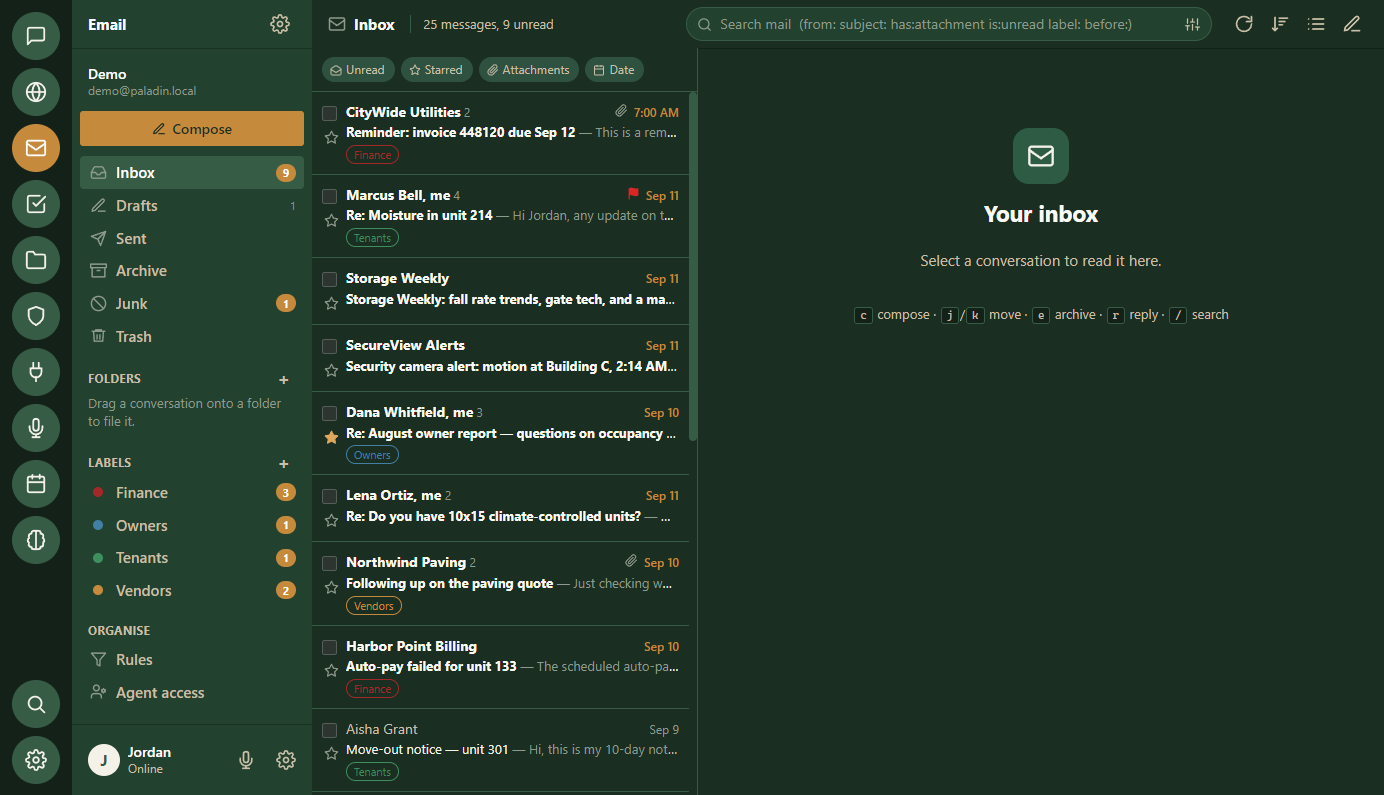
Paladin uses tools. It reads and sends email, runs your calendar, manages files, browses the web, and runs any module you’ve installed, from Cloudflare to Stripe.
“Move Thursday’s three o’clock to Friday morning. Tell them the inspection ran long.”
- CalendarFound the owners’ call, Thursday 3:00, with Dana and Marcus.
- CalendarFriday 10:00 is free for all three. Moved it there.
- EmailWrote to both with the reason, in your words.
- YouThe note is in front of you. It sends when you say so.
Add a skill. It knows the job.
Install a skill, plugin, integration or MCP server from the Armory, and Paladin knows how to use it right away. Each module teaches it how.
- Nothing to set up and nothing to teach by hand. The manual arrives with it.
- Nothing arrives that you did not add, and anything you add comes off as easily.
A spreadsheet, a report, a design brief. How the job is done, written down for it.
Real screens for you, and the instructions that teach your agent to work in them.
Connected once. The key is sealed on your machine, not ours.
Added by its address. Its tools become your agent’s tools.
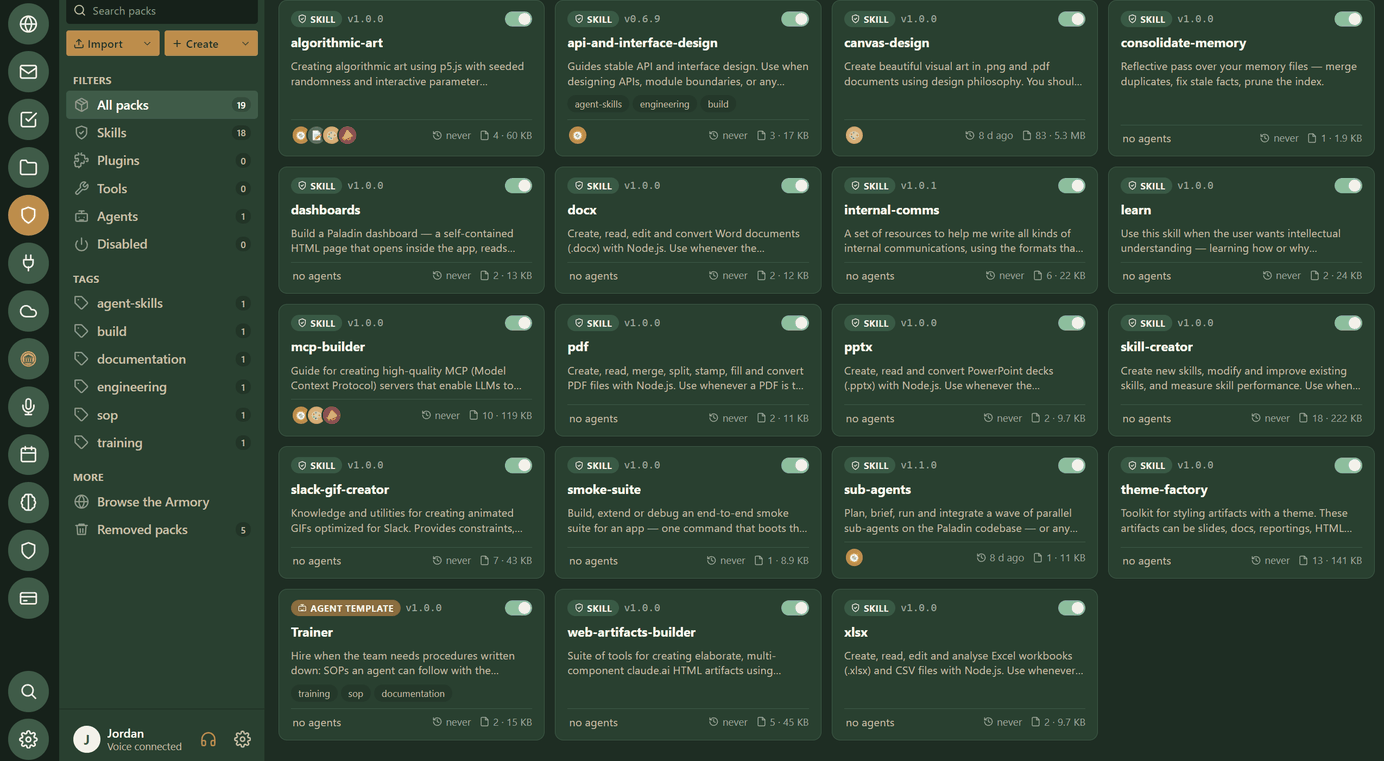
Same inbox. Same files. Same calendar.
Everything Paladin does, you can see and do yourself. It has the same email, the same files and the same calendar as you. You work side by side in one app, and Paladin can pick up any task.
Pair your phone. Take your agent with you.
Scan one code and your phone opens straight onto Paladin on your computer. Read any conversation, reply, and watch each step as it works, wherever you are. There is no app to download: it sits on your home screen like one.
- Anything that needs your yes still waits for you at the computer, and the phone tells you so.
- Pair up to five phones. Remove one in Settings and it is signed out at once.
Coming next: a PIN or Face ID lock on the phone, and talking to your agent out loud from it.
- ComputerSettings, Phone, Pair a phone. A code appears on the screen.
- PhonePoint the camera at the code and open the link. Paired.
- PhoneAdd it to your home screen. It opens like an app.
- AnywhereEvery conversation, newest first. Replies arrive as it writes them.
Encrypted end to end with a key made when you paired. The relay in between can’t read it.
What it needs: your computer switched on, with Paladin running. Your agent keeps working there, and the phone is how you reach it.
It has a voice. Hear it say hello.
This is Paladin speaking through its own voice engine, not an actor. Talk to it the same way: it hears you while you are still speaking and answers out loud.
- Talk over the top of it. It stops the moment you start.
- Hands free: it reads the calendar, the inbox and the files out loud.
- Pick the voice. This one is called Heart.
“Hi, I’m Nova, Chief Technology Officer at Paladin. We’re excited to begin our alpha demos. If you’d like to be invited to Paladin’s alpha program, enter your email above.”
The clip would not play here. The words are above.
Bring any brain. Keep your agent.
Paladin is still being built, and every screenshot on this page is the real window rather than a drawing of one. Leave your address and we will write when you can install it, with the occasional note on how the build is going in between.
We have sent a link from no-reply@paladinaios.com. Click it to join the list, and we will write when Paladin opens, and now and then while it is being built. You can leave from any message.
For Windows and Mac. Sign in with the model account you already have.
Help build it.
This is a long build. A pledge is a gift toward it — it pays for the months between now and the day it opens. Paladin itself is free for everyone, so a pledge buys nothing extra: it is how the build gets paid for.
- Paladin is free for everyone when it opens. A pledge is thanks for helping, not a ticket in.
- Stripe takes the card on its own page. We never see the number.
- One receipt by email from Stripe. No subscription, no repeat charge.
- Give what you like, once. Any amount works.
Type any amount from $1 on Stripe's page
Opens Stripe's donate page, then brings you back here. Card, Apple Pay and Google Pay.